

Google’s Massive AI Drop: From "Vibe Coding" to Native Mac Apps
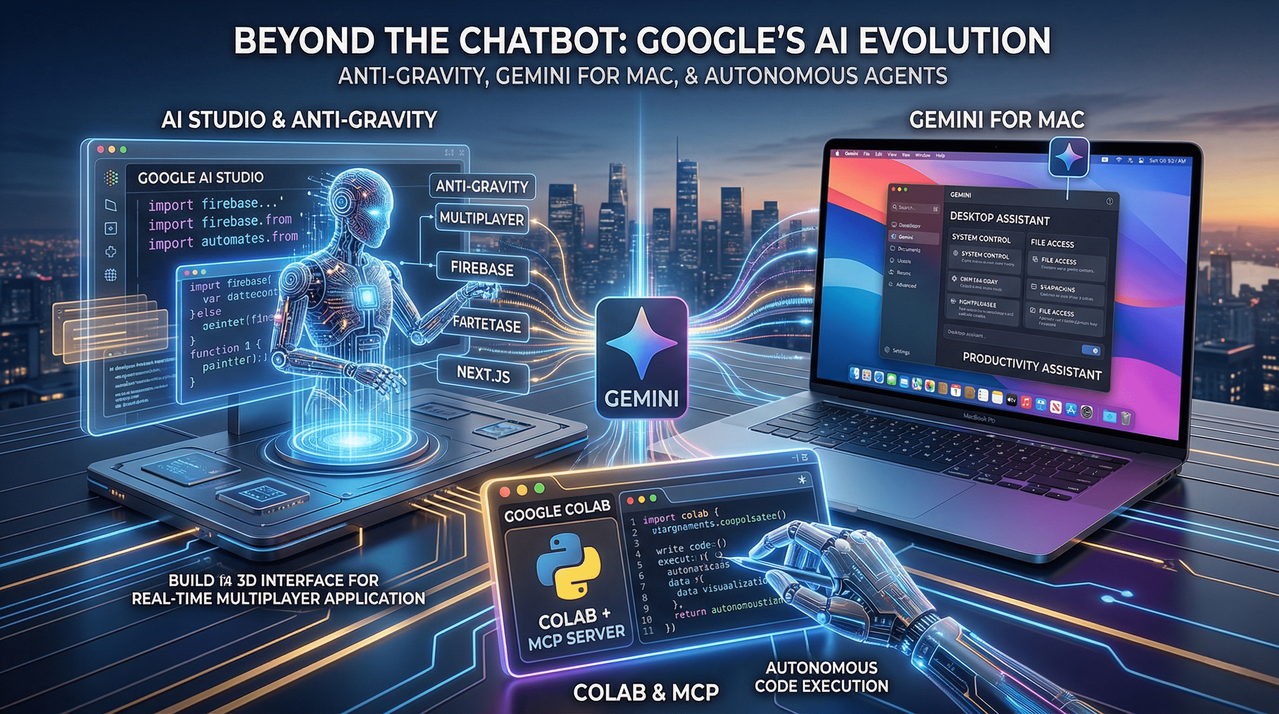
If you feel like the AI world is moving at a breakneck pace, you’re not alone. Google just dropped a series of updates that signal a major shift in how we build and interact with technology. We aren't just talking about minor tweaks here; we’re looking at a complete overhaul of Google AI Studio, a strategic move onto macOS, and a revolutionary way for AI agents to handle Google Colab.
Let’s break down why this matters and what it actually means for your workflow.
1. AI Studio & "Anti-Gravity": The End of the "Rough Mockup"
For a while now, "vibe coding"—describing an app and watching AI build it—has been the trend. The problem? Most AI-generated apps look great for ten seconds and then fall apart the moment you try to add a database or a login screen.
Google is trying to fix that with a new coding agent called Anti-gravity.
Instead of just handing you a pretty UI, Anti-gravity is built to create "production-ready" structures. The standout feature? Real-time multiplayer support. Building tools where multiple people can collaborate at once is notoriously hard because of backend syncing. Google has solved this by integrating Firebase directly.
- Smart Backend: The agent detects when you need a database and sets up Cloud Firestore or Firebase Authentication automatically.
- Polish: It now pulls in modern tools like Framer Motion and Shadcn to make sure the app doesn't just work—it looks professional.
- Production Power: With Next.js support and a built-in Secrets Manager for API keys (like Google Maps or Stripe), we are moving away from "toys" and toward real software.
My Take: The demo of a retro-style multiplayer laser tag game built from a single prompt is flashy, but the real win is the persistence. Being able to close your browser, come back, and have the AI remember exactly where you were in the project is a massive quality-of-life improvement.
2. Gemini is Moving into Your Mac
For a long time, using Gemini on a Mac meant keeping a browser tab open. That’s fine for a quick question, but it’s not how we work.
Reports are now confirming that a dedicated Gemini app for macOS is in internal testing. This is the clearest sign yet that the Apple-Google partnership is becoming a "real product" reality.
Why a native app changes everything:
- Deep Integration: A native app could eventually have file access and system-level control.
- Workflow: Instead of a chatbot, it becomes a productivity assistant that sits alongside you all day, potentially helping with document management or task automation.
- The Apple Layer: There is heavy speculation that Gemini might eventually feed into Siri or Apple Intelligence. If Google gets a seat inside Apple’s tightly controlled ecosystem, the strategic landscape changes overnight.
3. Collab + MCP: Giving AI "Hands"
This is perhaps the "nerdiest" update, but arguably the most impactful for developers and data scientists. Google released the Collab MCP (Model Context Protocol) server.
In the past, if you wanted an AI to help with data, you’d copy code from the AI, paste it into Collab, run it, find an error, and go back to the AI. It was a tedious loop.
Now, using the MCP standard, AI agents can directly control Google Colab.
- The AI can create, edit, and run Python code inside a notebook on its own.
- It can install packages, create variables, and "remember" the state of the notebook.
- Local Control, Cloud Power: Your local machine acts as the brain (the agent), while Colab’s cloud environment does the heavy lifting.
If you tell an agent to "analyze this CSV and give me a regression plot," it doesn't just tell you how to do it—it actually does it.
The Bottom Line
Google is clearly tired of Gemini being seen as "just another chatbot." By beefing up the developer tools in AI Studio and moving toward native desktop integration, they are positioning AI as a collaborator rather than just a search engine with a personality.
We’re moving from the era of "AI as a gimmick" to "AI as a backbone." It’s an exciting—if slightly overwhelming—time to be in tech.
What do you think? Are you ready to let an AI agent handle your backend, or do you still prefer the manual touch? Let’s chat in the comments.


Comments
No comments yet. Be the first to share your thoughts!
Leave a Comment